Spanish DNI OCR API
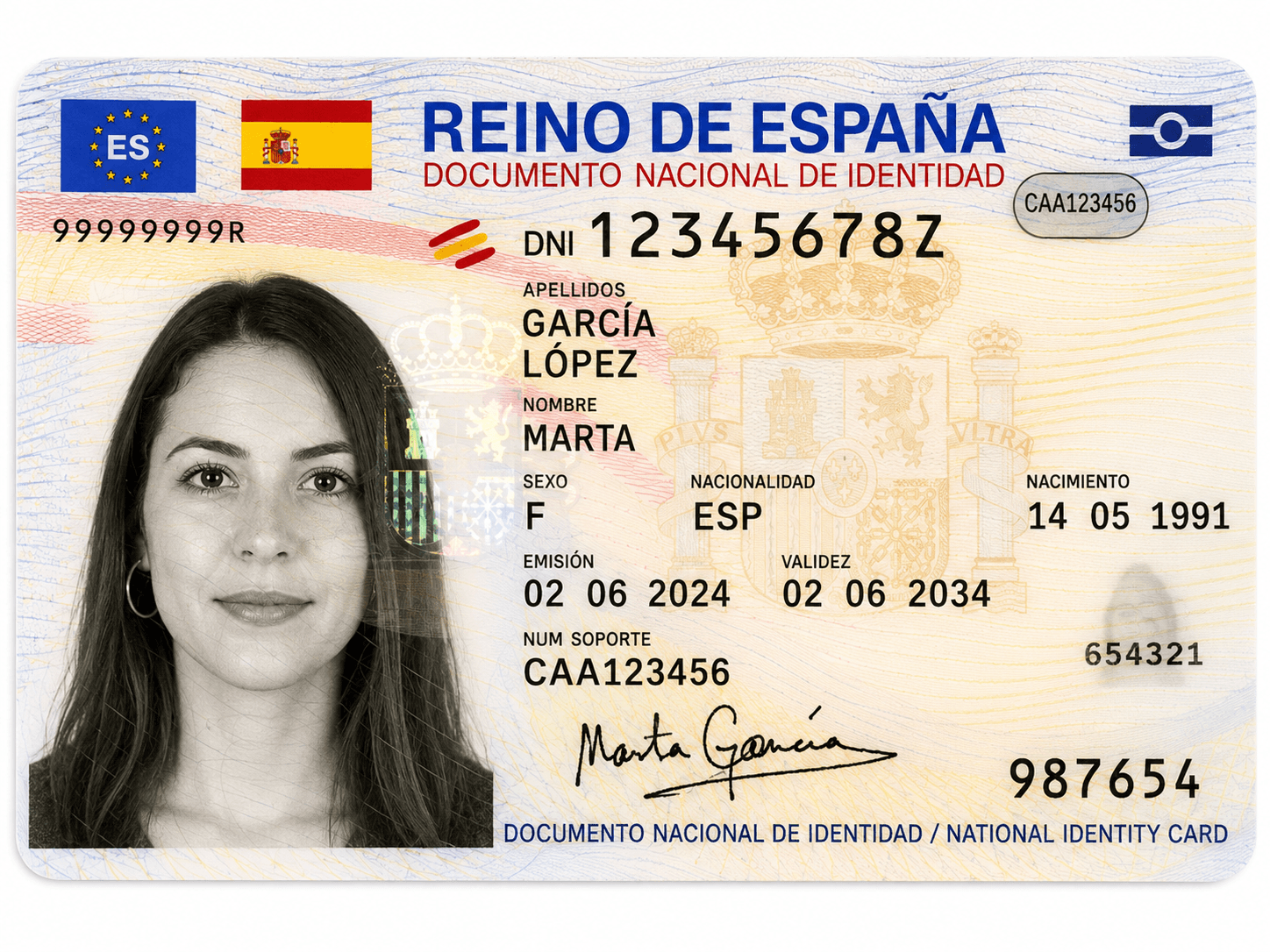
Extract full name, DNI/NIE number, support number (número de soporte), MRZ verification, and structured address from both sides of the Spanish national ID card. Automate bank KYC, notary onboarding, and employee registration.




Try it out
Experience the power of our OCR. Upload a document and see the results instantly.
Drop document or click to upload
Supports PDF, PNG, JPG (max 10MB)
By uploading a document, you agree to our terms. We do not store your data.
Spanish DNI number (DNI)
Whether the DNI control letter has been mathematically verified
The unique document number (Número de soporte)
Whether the document number has been verified against the MRZ
Foreign ID number (NIE). Only present when document is NIE.
Whether the foreign ID number has been mathematically verified
Holder's given name(s) (Nombre)
Whether the name has been verified against the MRZ
Holder's first (paternal) surname (Primer apellido)
Whether the first surname has been verified against the MRZ
Holder's second (maternal) surname (Segundo apellido)
Whether the second surname has been verified against the MRZ
Holder's date of birth (Fecha de nacimiento)
Whether the birth date has been verified against the MRZ
Date on which the document expires (Fecha de expiración)
Whether the expiration date has been verified against the MRZ
Date on which the document was issued (Fecha de emisión)
Code identifying the office and team that issued the document (Equipo)
Holder's gender as a single letter (e.g. M or F) (Género)
Whether the gender has been verified against the MRZ
Full address as it appears on the document, unparsed (Dirección completa)
Type of road (Tipo de vía)
Name of the street or road (Nombre de la vía)
Street number (Número)
Floor within the building (Planta)
Door or apartment identifier within the floor (Número de puerta)
Province of the registered address (Provincia)
Municipality of the registered address (Municipio)
Town or city of the registered address (Población)
Whether a Machine Readable Zone (MRZ) was detected on the document
Common questions
Quick answers to common questions about our Spanish DNI OCR API.
How can I get the best accuracy?
To ensure the highest extraction quality, use high-resolution pictures with good lighting and always include both the front and back side images of the document in your request.
Does it support one side of the document?
Yes, but processing only one side will result in lower accuracy and might miss important information that is only present on the other side.
Does it support old versions of the document?
Yes, it supports any version of the Spanish ID Document (DNI), including the older pre-electronic versions.
Does it structure the DNI address?
Yes, it extracts and structures the address into specific fields including road type, road name, number, floor, door, province, municipality, and town.
Does it support NIE documents?
Partially yes. When the document is a NIE (Tarjeta de Identidad de Extranjero), the NIE number is returned in the foreign_id_number field. For DNI documents, foreign_id_number is null.
Integrate our API in seconds
Start extracting data from your documents in seconds with our ready-to-use OCR API.
curl -X POST "https://api.tiny-idp.com/api/extractors/run/es-national-id-card" \
  -H "x-api-key: YOUR_API_KEY" \
  -F "files=@/path/to/your/document.jpg"
const formData = new FormData();
const fileInput = document.querySelector('input[type="file"]');
formData.append('files', fileInput.files[0]);

const response = await fetch("https://api.tiny-idp.com/api/extractors/run/es-national-id-card", {
  method: 'POST',
  headers: {
    'x-api-key': 'YOUR_API_KEY'
  },
  body: formData
});

const result = await response.json();
console.log(result);import requests
url = "https://api.tiny-idp.com/api/extractors/run/es-national-id-card"
headers = {"x-api-key": "YOUR_API_KEY"}
files = {"files": open("document.jpg", "rb")}
response = requests.post(url, headers=headers, files=files)
print(response.json())<?php
$ch = curl_init();
curl_setopt_array($ch, [
CURLOPT_URL => "https://api.tiny-idp.com/api/extractors/run/es-national-id-card",
CURLOPT_POST => true,
CURLOPT_RETURNTRANSFER => true,
CURLOPT_HTTPHEADER => [
'x-api-key: YOUR_API_KEY',
'Accept: application/json'
],
CURLOPT_POSTFIELDS => [
'files' => new CURLFile('/path/to/your/document.jpg')
]
]);
$response = curl_exec($ch);
curl_close($ch);
echo $response;


Integrate with your coding agent
Copy instructions for Claude Code, Cursor, ChatGPT, and other agents to integrate Tiny IDP.
Ready to build?
Get your free API key and start extracting data from documents in minutes. No credit card required for the free tier.
Common use cases
Discover how businesses are using our OCR API to automate their workflows.
Spanish bank & neobank KYC
Extract DNI/NIE, support number and MRZ-verified identity fields to open accounts under SEPBLAC expectations without manual back-office typing.
Real estate & notary onboarding
Pull structured name, ID and domicilio from both sides of the DNI for rental contracts, escrituras prep and property platforms.
Telco & utility activations
Capture ID and registered address to activate mobile lines, fiber or energy contracts while keeping GDPR-friendly zero retention.
HR & payroll identity capture
Onboard Spanish employees with verified DNI data, issuing team and expiry dates ready for SS / payroll systems.
Simple, Transparent Pricing
No hidden fees. No monthly minimums. Pay only for what you extract.
Usage-Based
Simple pay-as-you-go pricing. No monthly commitment.
- Unlimited extractors
- Pre-built & custom extractors
- OCR and AI technology
- GDPR compliant
- EU-hosted infrastructure
- Standard support
Enterprise
Tailored pricing for high-volume scenarios. Get SLA guarantees, on-premise deployment, and dedicated support — reach out and we'll put together a plan that fits your scale.
- Custom pricing models
- SLA guarantees
- On-premise deployment options
- Custom integration support
- 24/7 dedicated support
- Priority feature requests
All prices exclude VAT. Volume discounts apply automatically.
Enterprise-grade Compliance & Security
We take data privacy seriously. Tiny IDP is built from the ground up to meet the strictest European data protection standards.
Zero Data Retention
We don't store your documents, images, or predictions. Data is processed in-memory and immediately discarded.
GDPR Compliant
Full compliance with European data protection regulations (GDPR) for your peace of mind.
EU-Based Infrastructure
All data is processed and hosted exclusively in secure European data centers.
Do you need a custom OCR?
Need custom document extraction? Define your own JSON schema to extract structured data from any document format in seconds.