The Ultimate Guide to MRZ: Understanding TD1, TD2, and TD3
Learn how Machine Readable Zones (MRZ) work, the differences between TD1, TD2, and TD3 formats, and how to automate data extraction.
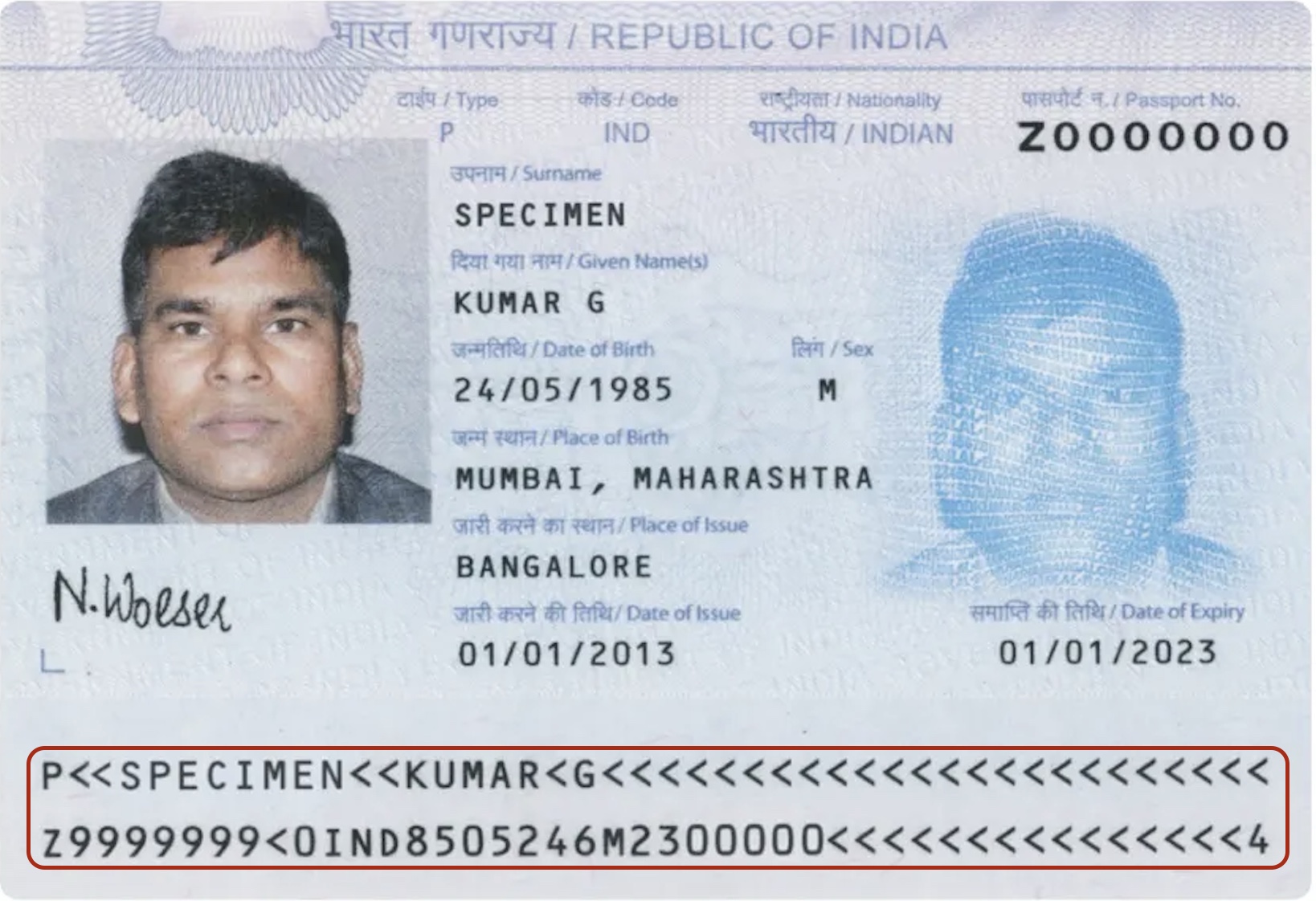
In the world of international travel and identity verification, the Machine Readable Zone (MRZ) is the gold standard. Whether you are building a check-in app, a fintech onboarding flow, or an automated border control system, understanding how to parse these characters is essential.
In this guide, we will break down the different types of Machine Readable Passports (MRP) and ID documents, their internal structures, and the best tools to extract this data—including how Tiny IDP can simplify your OCR workflow.
What is an MRZ?
The MRZ is a fixed-width area located at the bottom of identity documents, standardized by ICAO Doc 9303. It uses a specific OCR-B font to ensure that machines can reliably read data regardless of the document’s visual design.
There are three primary formats used globally:
- TD1 (Size 1): Typically used for ID cards (like the EU identity card). It consists of three lines of 30 characters each.
- TD2 (Size 2): Used for larger ID cards and some visas. It consists of two lines of 36 characters each.
- TD3 (Size 3): The standard for passports. It consists of two lines of 44 characters each.
TD1: The ID Card Standard
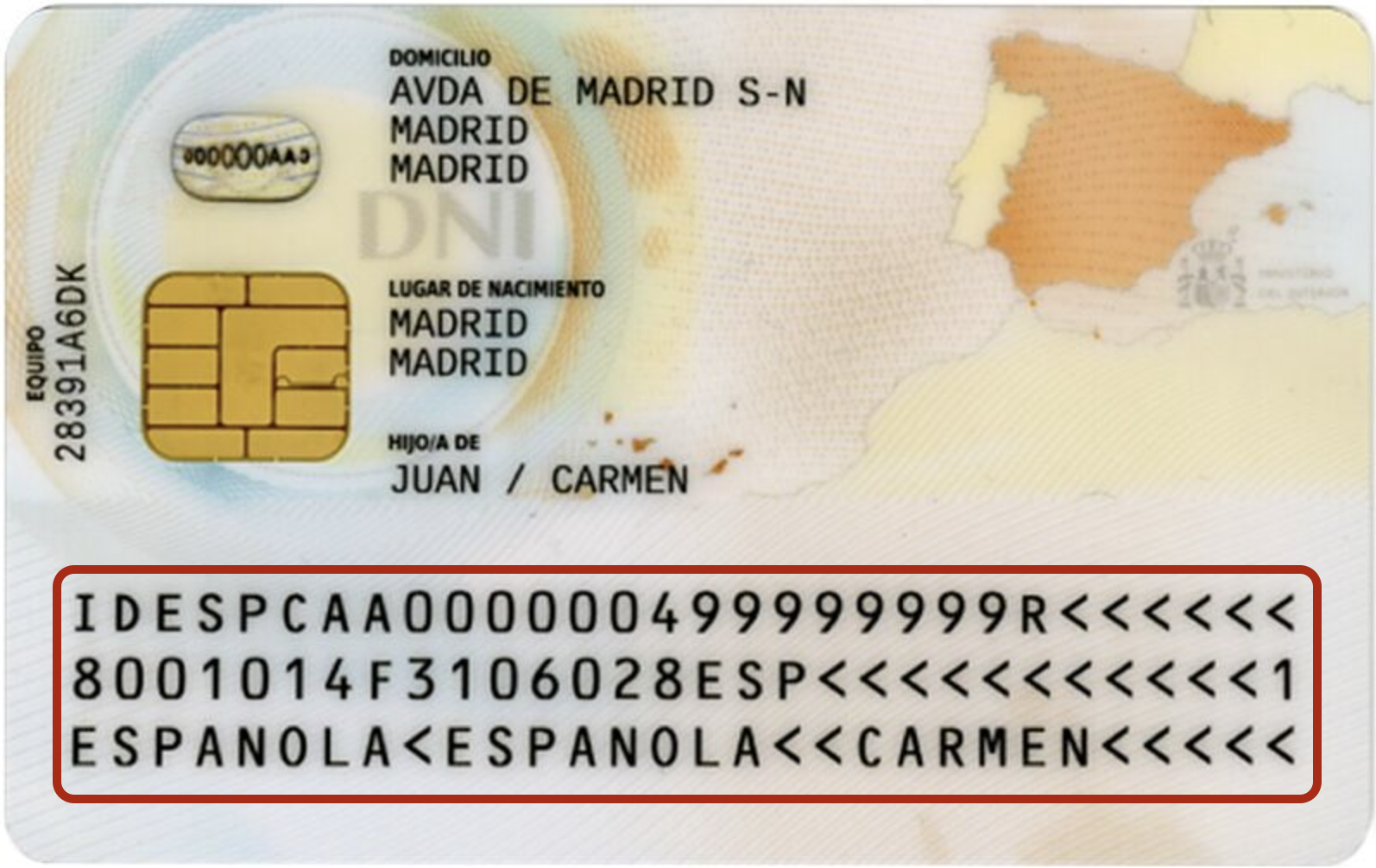
The TD1 format is the most compact and is frequently found on national identity cards (such as the Spanish National ID / DNI) and driver’s licenses.
Documents using TD1: EU Identity Cards, Spanish DNI, US Resident Alien cards.
TD1 Structure (3 Lines x 30 Characters)
| Line | Positions | Field | Check Digit |
|---|---|---|---|
| 1 | 1–2 | Document code (e.g., ID, IP) | No |
| 1 | 3–5 | Issuing State or organization (ISO 3166-1 alpha-3) | No |
| 1 | 6–14 | Document number | Yes (Pos 15) |
| 1 | 16–30 | Optional data (often empty or application-specific) | No |
| 2 | 1–6 | Date of birth (YYMMDD) | Yes (Pos 7) |
| 2 | 8 | Sex (M, F, or < for unspecified) | No |
| 2 | 9–14 | Date of expiry (YYMMDD) | Yes (Pos 15) |
| 2 | 16–18 | Nationality (ISO 3166-1 alpha-3) | No |
| 2 | 19–29 | Optional data | No |
| 2 | 30 | Composite check digit (for lines 1 & 2) | Yes |
| 3 | 1–30 | Name (Surname << Given names) | No |
TD2: The Intermediate Format
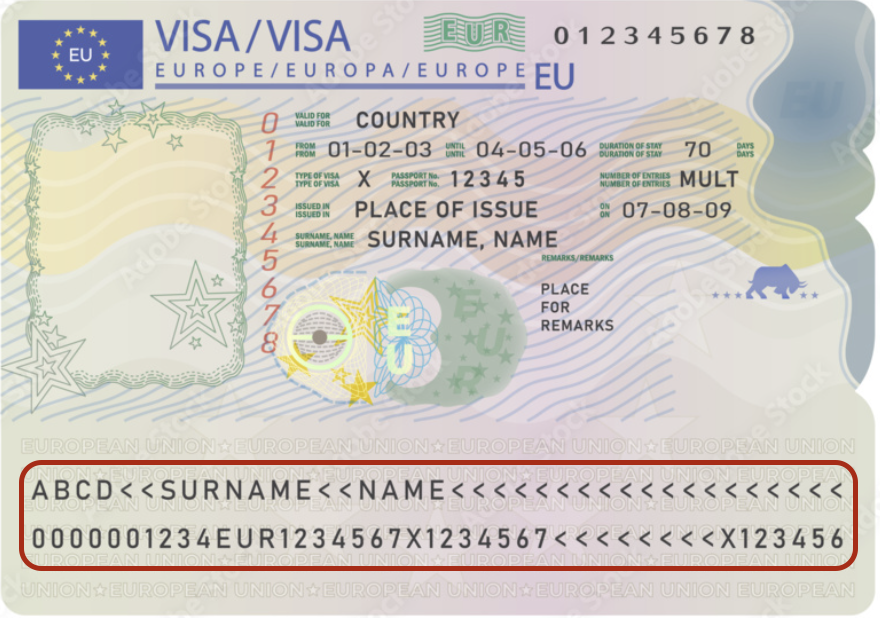
TD2 provides a slightly larger area than TD1 and is often used for documents that don’t quite fit the passport size but require more data than a standard ID card.
Documents using TD2: German ID cards (older versions), various international Visas.
TD2 Structure (2 Lines x 36 Characters)
| Line | Positions | Field | Check Digit |
|---|---|---|---|
| 1 | 1–2 | Document code | No |
| 1 | 3–5 | Issuing State | No |
| 1 | 6–36 | Name (Surname << Given names) | No |
| 2 | 1–9 | Document number | Yes (Pos 10) |
| 2 | 11–13 | Nationality | No |
| 2 | 14–19 | Date of birth (YYMMDD) | Yes (Pos 20) |
| 2 | 21 | Sex | No |
| 2 | 22–27 | Date of expiry (YYMMDD) | Yes (Pos 28) |
| 2 | 29–35 | Optional data | No |
| 2 | 36 | Composite check digit | Yes |
TD3: The Passport Standard
This is the format most people recognize. It is the global standard for passports (Machine Readable Passports - MRP), easily processed with a Passport OCR API.
Documents using TD3: International Passports.
TD3 Structure (2 Lines x 44 Characters)
| Line | Positions | Field | Check Digit |
|---|---|---|---|
| 1 | 1–2 | Document code (usually ‘P’ for Passport) | No |
| 1 | 3–5 | Issuing State | No |
| 1 | 6–44 | Name (Surname << Given names) | No |
| 2 | 1–9 | Passport number | Yes (Pos 10) |
| 2 | 11–13 | Nationality | No |
| 2 | 14–19 | Date of birth (YYMMDD) | Yes (Pos 20) |
| 2 | 21 | Sex | No |
| 2 | 22–27 | Date of expiry (YYMMDD) | Yes (Pos 28) |
| 2 | 29–42 | Personal number / Optional data | Yes (Pos 43) |
| 2 | 44 | Composite check digit | Yes |
Check Digits: Ensuring Data Integrity
One of the most powerful features of the MRZ is the Check Digit. Using a weighted modulus 10 algorithm, the MRZ allows systems to verify that the OCR engine hasn’t misread a “0” as an “O” or a “1” as an “I”. If the math doesn’t add up, the document is flagged for manual review.
Tools for Developers
If you are looking to parse raw MRZ strings in your application, there are several excellent open-source libraries available:
- Python: The `mrz` library is the most popular choice for parsing and generating MRZ strings according to ICAO standards.
- JavaScript/Node.js: `mrz-generator` or `mrz-parser` are great for client-side or server-side logic in web apps.
- C#/.NET: `MRZ-Parser` libraries are available on NuGet to handle document validation.
Moving Beyond Parsing: OCR APIs
Parsing a string is easy, but extracting that string from a grainy photo of a passport is the hard part. To do this reliably at scale, you need a specialized OCR API.
Google Cloud Vision
A powerful general-purpose OCR. Highly scalable but can require significant configuration to handle complex ID backgrounds.
AWS Textract
Great for structured forms, though it may sometimes struggle with the specific formatting of international IDs.
Tiny IDP
Purpose-built for identity documents. Optimized specifically for passports and IDs, ensuring high-accuracy MRZ extraction even in suboptimal lighting.
Automate Your MRZ Extraction Tiny IDP supports international ID documents and passports OCR. Check out our International ID Document OCR
Try it out here →Extract this data automatically
Need to extract MRZs from passports, national IDs, or driver's licenses? Tiny IDP does the heavy lifting for you.
Conclusion
The MRZ remains the backbone of identity document processing. By understanding the differences between TD1, TD2, and TD3, you can build more robust systems for data entry and verification.
Ready to automate your ID data extraction? Try Tiny IDP today and see how our specialized OCR can streamline your document processing.