Fields in Passports: The Complete Guide for Engineers & PMs
A technical deep-dive into ICAO 9303 standards, passport data types, and MRZ checksum validation for building automated extraction tools.
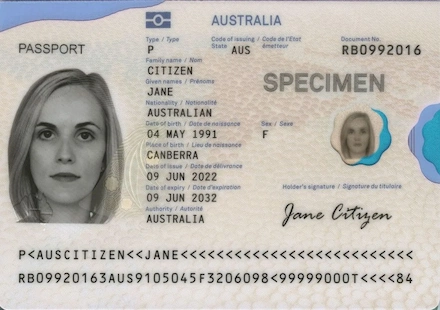
For engineers and product managers building identity verification (IDV) or automated onboarding flows, the passport is the ultimate source of truth. However, extracting data from it requires more than just standard OCR—it requires a specialized Passport OCR API and a deep understanding of the international standards that govern its design.
Passports are strictly standardized globally by the International Civil Aviation Organization (ICAO) under Doc 9303. This standard defines everything from the physical dimensions of the document to the exact character sets used in the Machine Readable Zone (MRZ).
This guide provides a technical breakdown of passport fields, data types, and the underlying standards you need to know to build robust data extraction tools.
1. The VIZ (Visual Inspection Zone): Mandatory Data Fields
The VIZ is the area designed for human reading, but it is also the primary target for OCR engines. According to ICAO Doc 9303 Part 3, the following fields are mandatory and follow specific data types.
| Field Name | Data Type / Format | Technical Notes for Engineers |
|---|---|---|
| Document Type | String (1-2 chars) | Standardized as "P" for Passport. Some countries use "PN" or "PV" for specific types. |
| Issuing State | ISO 3166-1 alpha-3 | Always a 3-letter code. Use a lookup table for full country names (e.g., "USA", "FRA"). |
| Passport Number | Alphanumeric | Length varies by country. Often includes check digits in the MRZ for validation. |
| Surname | String (Uppercase) | Primary identifier. In MRZ, non-standard characters (like ñ or ö) are transliterated. |
| Given Names | String (Uppercase) | Includes middle names. Separated by spaces in VIZ, but by "<" in MRZ. |
| Nationality | ISO 3166-1 alpha-3 | Usually matches Issuing State, but can differ for stateless persons or refugees. |
| Date of Birth | DD MMM YYYY | VIZ uses abbreviated months (e.g., "JAN") to avoid language confusion. MRZ uses YYMMDD. |
| Sex | Char (M, F, X) | "X" is the ICAO standard for unspecified or non-binary gender. |
| Date of Expiry | DD MMM YYYY | Critical for validity checks. Most business logic requires >6 months remaining. |
2. Common Optional Fields & Regional Variations
While the fields above are mandatory, ICAO allows for "Optional Data Elements." These vary significantly and often require custom parsing logic depending on the issuing country.
| Field Name | Technical Context | Implementation Challenge |
|---|---|---|
| Place of Birth | City and Country/State of birth. | Highly unstructured. Some countries omit it entirely (Canada) or use codes (Japan). |
| Personal ID Number | National ID (DNI, SSN, PESEL). | Often found in European and Asian passports. Useful for cross-referencing databases. |
| Height / Eye Color | Physical attributes. | Common in Germany and Switzerland. Usually requires parsing local units (cm vs ft/in). |
| Profession | Holder's job title. | Phasing out globally, but still present in some Middle Eastern and African passports. |
Pro Tip for PMs:If your product requires "Place of Birth" for KYC, be aware that it is not a guaranteed field in all ICAO-compliant documents. Always have a fallback or manual entry option.
3. The MRZ (Machine Readable Zone): The Developer's Best Friend
The MRZ is located at the bottom of the data page. It uses the OCR-B font and is designed for high-reliability machine reading. For a passport (TD3 format), it consists of 2 lines of 44 characters.
MRZ Checksum Validation
The MRZ isn't just text; it contains algorithmic check digits. This is the first line of defense against OCR errors. The algorithm uses a weighted modulus 10 system:
- Weights: 7, 3, 1 (repeating)
- Characters: 0-9, A-Z (A=10, B=11, etc.), < = 0
- Calculation: (Sum of (Value * Weight)) mod 10
// Example MRZ Line 2 Checksum Logic (Simplified)
const weights = [7, 3, 1];
let sum = 0;
for (let i = 0; i < data.length; i++) {
sum += getValue(data[i]) * weights[i % 3];
}
const checkDigit = sum % 10;
4. The e-Passport (Biometric) Layer
Modern passports (e-passports) contain an ISO/IEC 14443 contactless chip. This chip stores the same data as the VIZ and MRZ, but signed cryptographically by the issuing authority.
BAC (Basic Access Control)
To read the chip, you need a key derived from the MRZ (Passport No, DOB, Expiry). This prevents "skimming" the passport while it's in a pocket.
DG (Data Groups)
Data is organized into groups: DG1 (MRZ data), DG2 (Facial Image), DG3 (Fingerprints - restricted), DG15 (Active Authentication).
Implementation Strategy: OCR vs. NFC
When building an extraction tool, you should ideally use a hybrid approach:
- OCR the MRZ: Fast, works on all smartphones, and provides the keys needed for NFC.
- OCR the VIZ: Extracts fields not present in the MRZ (like Place of Birth or Issuing Authority).
- NFC Read (Optional): If the device supports it, use the MRZ keys to read the chip for 100% data accuracy and authenticity verification.
Hidden Fields: What the Machines Read
Aside from the text you can read with your eyes, your passport contains two massive "hidden" fields that border control agents care about the most.
The Machine Readable Zone (MRZ)
Look at the bottom of your passport's photo page. You'll see two lines of text filled with names, numbers, and lots of <<<< chevrons. This is the MRZ.
It contains 2 lines of 44 characters that strip down all your vital data (Name, Passport Number, DOB, Expiration) into a format that optical scanners can read instantly. It also contains Checksum digits—algorithmic numbers that immediately tell the computer if a passport number or birth date has been forged or altered.
The Biometric RFID Chip
If your passport has a small rectangular camera-like gold symbol on the front cover, you have an e-Passport. Since 2006, most countries have embedded a microchip inside the cover. If you could "read" this chip, you would find:
- A High-Resolution Facial Scan: This is what automated e-gates at airports use to run facial recognition against your live face.
- Fingerprints: Mandated by the European Union for all member states' passports.
- Digital Signature: A cryptographic key proving the data was written by a legitimate government and hasn't been hacked or tampered with.
Automate Passport Data Extraction Tiny IDP provides a specialized OCR API for ICAO 9303 documents. Extract VIZ and MRZ data with built-in checksum validation and high accuracy.
View API Documentation →Extract this data automatically
Need to implement automated passport verification in your system? Tiny IDP extracts VIZ and MRZ data with built-in checksum validation and high accuracy.
Conclusion
Your passport is more than just a travel document; it is a blend of global unity and national identity. The next time you're waiting in line at an airport, take a flip through your booklet. You'll be looking at a perfect piece of international engineering—designed to keep the world moving securely, one field at a time.