German ID Card OCR API
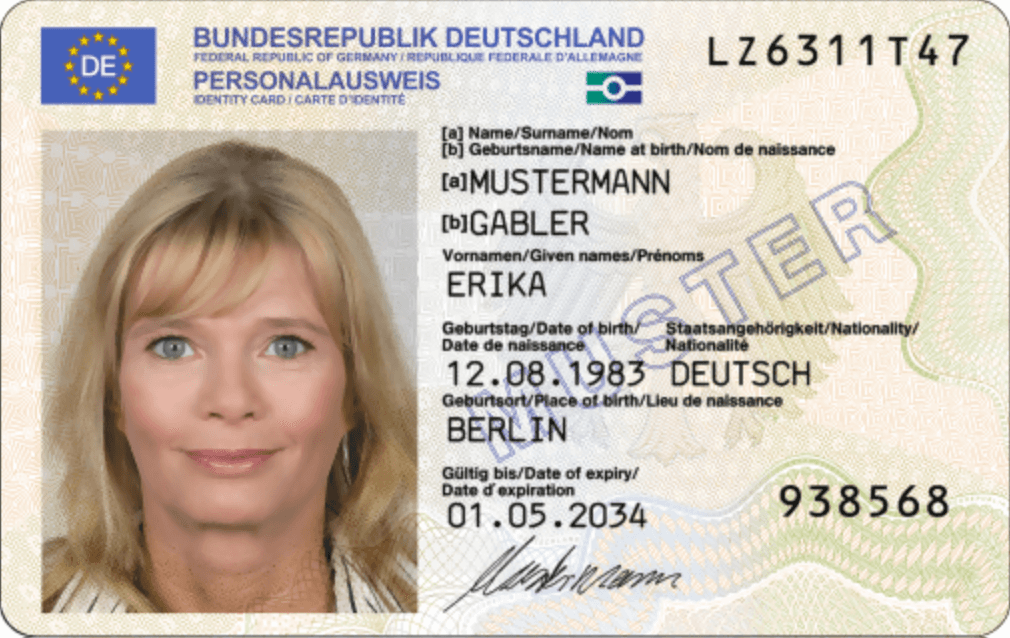
Extract name, card number, MRZ-verified identity fields and the registered address from both sides of the German Personalausweis. Umlauts and ß are preserved exactly as printed, with ASCII companions for banking and tax systems.




Try it out
Experience the power of our OCR. Upload a document and see the results instantly.
Drop document or click to upload
Supports PDF, PNG, JPG (max 10MB)
By uploading a document, you agree to our terms. We do not store your data.
Not quite what you need? We can adapt fields: add, split, or reshape them. Tell us
Kind of German ID. PERSONALAUSWEIS is the standard chipped card with an MRZ. VORLAEUFIGER_PERSONALAUSWEIS is the temporary card with no chip or MRZ. OTHER if neither.
Card number on the front (Ausweisnummer): nine characters, an authority letter then eight alphanumerics. Excludes A, B, D, E, I, O, Q, S, U to avoid OCR ambiguity.
True when the MRZ document-number check digit is valid and matches the number on the card face.
Card Access Number (Zugangsnummer): six digits on the front, used for chip access. Not encoded in the MRZ.
Issuing authority (Behörde) printed on the back, usually a municipality, e.g. "Stadt Köln".
Issue date (Ausstellungsdatum), ISO YYYY-MM-DD. Printed on the back and absent from the MRZ, so never MRZ-verified.
Expiry date (Gültig bis), ISO YYYY-MM-DD.
True when the MRZ expiry check digit is valid and matches the date on the card face.
Family name as printed (Name), umlauts and ß kept. German cards carry one surname: particles ("von der Leyen") and double names ("Müller-Lüdenscheidt") stay in this value and are never split.
Surname in the MRZ ASCII transliteration (Ä→AE, Ö→OE, Ü→UE, ß→SS), e.g. "MUELLER-LUEDENSCHEIDT".
True when the printed surname matches the MRZ surname after transliteration.
All given names as printed (Vornamen), single-spaced, e.g. "Erika Anna Maria". Never the surname or a degree.
Given names in the MRZ ASCII transliteration.
True when the printed given names match the MRZ given names after transliteration.
Name at birth (Geburtsname), present only when it differs from the surname, sometimes inline as "geb. Schmidt". Null otherwise. Never merged into `surname`.
Birth name in the MRZ ASCII transliteration.
Doctoral degree (Doktorgrad), e.g. "DR.", "DR. MED.", "PROF. DR.". A separate field, never part of the name, and not in the MRZ.
Religious or stage name (Ordensname / Künstlername) printed on the back, when present.
Date of birth (Geburtstag), ISO YYYY-MM-DD.
True when the MRZ birth-date check digit is valid and matches the date on the card face.
Place of birth (Geburtsort) as printed, umlauts kept, e.g. "Köln". May include a country for holders born abroad.
Sex (Geschlecht) as an ICAO code: M (male), F (female), X (divers/unspecified). Normalized from M/F on current cards, M/W (weiblich) on older ones, and D (divers) since 2018.
True only when the MRZ sex was read and agrees with the card face. False when either is missing or the two differ.
Height in whole centimetres (Größe), e.g. 178. Older cards printing metres ("1,78 m") are normalized to centimetres.
Eye colour (Augenfarbe) normalized to a fixed set: BLAU, BRAUN, GRAU, GRUEN, BLAU-GRAU, GRAU-BRAUN, GRAU-GRUEN, GRUEN-BRAUN, SCHWARZ. OTHER when the printed value matches none of these; see `eye_colour_raw`.
Eye colour exactly as printed, umlauts kept, e.g. "GRÜN" or "grau-grün".
Full registered address (Anschrift) from the back, line breaks collapsed to single spaces, e.g. "Heidestraße 17 51147 Köln".
Street name without the house number, e.g. "Heidestraße".
Street name in ASCII, e.g. "Heidestrasse".
House number as text, since German ones use letter suffixes and ranges, e.g. "17", "17a", "17-19".
German postal code (Postleitzahl), always five digits, e.g. "51147".
City or town of the address (Ort) as printed, e.g. "Köln".
City in ASCII, e.g. "Koeln".
Federal state (Bundesland). Usually null: the Personalausweis does not print one, and it is never inferred from the postal code or city. Use `address_zip_code` to derive a region yourself.
Address country as an ISO 3166-1 alpha-3 code. "DEU" when a German address is printed, null otherwise.
True when a German address is printed. False only when the card states "KEINE HAUPTWOHNUNG IN DEUTSCHLAND", where every structured address field is null and `raw_address` holds that notice. Null when no address was captured (e.g. a front-only scan), so "not read" is never mistaken for "no residence".
True when three MRZ lines were found. False for the temporary card, which has no MRZ. Raw MRZ lines are not returned.
True when the MRZ parsed and every ICAO 9303 check digit passed, including the composite. False when absent, unparseable, or any checksum fails.
Common questions
Quick answers to common questions about our German ID Card OCR API.
How can I get the best accuracy?
Use high-resolution images with good lighting and always send both the front and the back of the card in the same request. The front carries the name, card number and expiry date; the back carries the address, issuing authority, height, eye colour and the MRZ.
Are umlauts and ß handled correctly?
Yes. Name, address and place-of-birth fields keep the exact characters printed on the card, including Ä, Ö, Ü and ß. Because the MRZ can only encode ASCII, we also return *_ascii companion fields with the official transliteration (Ä→AE, Ö→OE, Ü→UE, ß→SS), which is what SEPA, ELSTER and DATEV expect.
How are surnames handled?
German cards carry a single surname, so it is never split. Nobiliary particles such as "von der Leyen" and hyphenated double names such as "Müller-Lüdenscheidt" are returned as one value. The Geburtsname (birth name) and the Doktorgrad are returned in their own separate fields and are never merged into the name.
What does gender return, and how is "W" handled?
Gender is always returned as the ICAO code M, F or X. German cards print M/F, older cards print M/W (W for weiblich, meaning female) and cards issued since 2018 may print D (divers). All of these are normalized: W becomes F and D becomes X. gender_verified is true only when the MRZ and the printed field genuinely agree.
Why is address_state usually null?
The German Personalausweis does not print a Bundesland. The address is only street, house number, postal code and city. We deliberately never guess the state from the postal code, so address_state is null on virtually every card. Use address_zip_code if you need to derive a region yourself.
What do the _verified fields mean?
They are computed in our code, never by the model. A field is verified when the ICAO 9303 check digit in the MRZ is mathematically valid and the MRZ value matches what is printed on the card face. false means we could not confirm the value, not that it is wrong. mrz_valid reports whether every check digit in the MRZ passed, including the composite one.
Does it support older cards and the temporary ID?
Yes. It supports the current chip card, the 2021 variant and the older pre-2010 laminated cards. The temporary card (Vorläufiger Personalausweis) is also supported and is reported as document_type VORLAEUFIGER_PERSONALAUSWEIS; it has no MRZ, so mrz_detected is false and no field can be MRZ-verified.
Integrate our API in seconds
Start extracting data from your documents in seconds with our ready-to-use OCR API.
curl -X POST "https://api.tiny-idp.com/api/extractors/run/de-national-id-card" \
  -H "x-api-key: YOUR_API_KEY" \
  -F "files=@/path/to/your/document.jpg"
const formData = new FormData();
const fileInput = document.querySelector('input[type="file"]');
formData.append('files', fileInput.files[0]);

const response = await fetch("https://api.tiny-idp.com/api/extractors/run/de-national-id-card", {
  method: 'POST',
  headers: {
    'x-api-key': 'YOUR_API_KEY'
  },
  body: formData
});

const result = await response.json();
console.log(result);import requests
url = "https://api.tiny-idp.com/api/extractors/run/de-national-id-card"
headers = {"x-api-key": "YOUR_API_KEY"}
files = {"files": open("document.jpg", "rb")}
response = requests.post(url, headers=headers, files=files)
print(response.json())<?php
$ch = curl_init();
curl_setopt_array($ch, [
CURLOPT_URL => "https://api.tiny-idp.com/api/extractors/run/de-national-id-card",
CURLOPT_POST => true,
CURLOPT_RETURNTRANSFER => true,
CURLOPT_HTTPHEADER => [
'x-api-key: YOUR_API_KEY',
'Accept: application/json'
],
CURLOPT_POSTFIELDS => [
'files' => new CURLFile('/path/to/your/document.jpg')
]
]);
$response = curl_exec($ch);
curl_close($ch);
echo $response;


Integrate with your coding agent
Copy instructions for Claude Code, Cursor, ChatGPT, and other agents to integrate Tiny IDP.
Ready to build?
Get your free API key and start extracting data from documents in minutes. No credit card required for the free tier.
Common use cases
Discover how businesses are using our OCR API to automate their workflows.
German bank & fintech KYC
Read the Ausweisnummer, date of birth and address from both sides of the Personalausweis to onboard customers under GwG identification duties without back-office typing.
HR onboarding & payroll
Capture verified identity data for the Personalakte, with ASCII name variants ready for DATEV, ELSTER and SEPA payment files that reject umlauts.
Meldewesen & property management
Pull the registered Anschrift as structured street, house number, PLZ and Ort for Wohnungsgeberbestätigung, rental contracts and tenant portals.
Telco, energy & insurance contracts
Verify identity and address to activate mobile, fibre or energy contracts, with MRZ check digits validated on every request and zero data retention.
Simple, Transparent Pricing
No hidden fees. No monthly minimums. Pay only for what you extract.
Usage-Based
Simple pay-as-you-go pricing. No monthly commitment.
- Unlimited extractors
- Pre-built & custom extractors
- OCR and AI technology
- GDPR compliant
- EU-hosted infrastructure
- Standard support
Enterprise
Tailored pricing for high-volume scenarios. Get SLA guarantees, on-premise deployment, and dedicated support — reach out and we'll put together a plan that fits your scale.
- Custom pricing models
- SLA guarantees
- On-premise deployment options
- Custom integration support
- 24/7 dedicated support
- Priority feature requests
All prices exclude VAT. Volume discounts apply automatically.
Enterprise-grade Compliance & Security
We take data privacy seriously. Tiny IDP is built from the ground up to meet the strictest European data protection standards.
Zero Data Retention
We don't store your documents, images, or predictions. Data is processed in-memory and immediately discarded.
GDPR Compliant
Full compliance with European data protection regulations (GDPR) for your peace of mind.
EU-Based Infrastructure
All data is processed and hosted exclusively in secure European data centers.
Do you need a custom OCR?
Need custom document extraction? Define your own JSON schema to extract structured data from any document format in seconds.